Dictation gets English right and your vocabulary wrong.
Lexicon is one YAML file of the words you actually say (brands, people, products, acronyms), applied to every transcript before an agent reads it. It is not a dictation app. It sits between the one you already use and whatever you are talking to.
curl -fsSL https://ashlrai.github.io/lexicon/install.sh | shTakes about a minute: it writes ~/.config/lexicon/lexicon.yaml, asks how your company and your own name should be spelled, and registers the MCP server with every agent client it finds on the machine.
No global install: npx @ashlr/lexicon@latest setup. Homebrew, npm and the Claude Code plugin are under install.
ping ashler about the cuban eats rollout on versal
ping Ashlr.AI about the Kubernetes rollout on Vercel
Recognizers have never heard the word.
Every spelling below is an alias shipped in Lexicon’s starter packs, because every one of them is a transcription somebody actually got.
- Ashlr.AIashlera masonry block, not your company
- Kubernetescuban eatsno referent at all
- Anthropicand tropictwo words, neither of them right
- Supabasesuperbasea different product
- Vercelversalnot a word
- PostgreSQLpostgre sequelhalf a name and a TV term
None of this is the recognizer’s fault. Every dictation app keeps a private dictionary to patch it, and none of those dictionaries help when the transcript is produced somewhere else, which is exactly what happens when you talk to an agent.
The real matcher, in your browser.
This is not a mock-up. The page compiles Lexicon’s src/core to a browser bundle, loads the 176 curated starter terms, and runs the same matcher the CLI runs. Type anything. Nothing you write is sent anywhere.
Loading the matcher…
Waiting for input.
Runs entirely in your browser. The matcher is compiled from the same src/core the CLI uses; nothing you type leaves the page.
Type a brand, product or surname. Lexicon guesses the spellings a recognizer will produce, then you add it once.
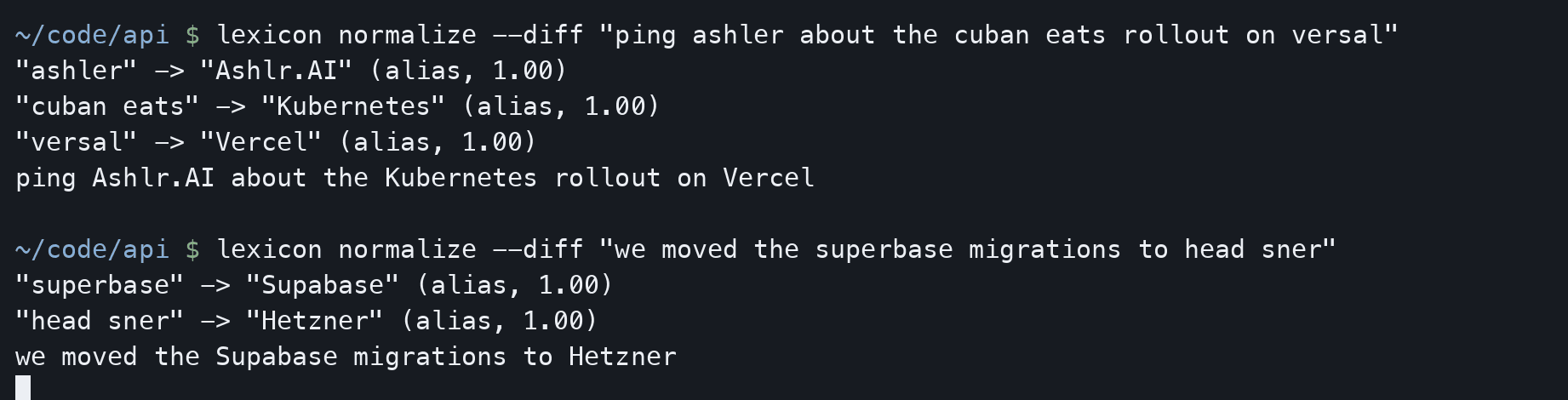
Nothing above is a browser trick. The same call is one command, and --diff prints every replacement it made above the line it produced, so you can see what it touched before you trust it with a transcript.
Works wherever you talk to an agent.
- Claude Code
- Claude Desktop
- Cursor
- Windsurf
- Gemini CLI
- OpenAI Codex
- VS Code
lexicon install writes the MCP server into each client’s own config file. Any other MCP client works too: lexicon install generic prints the block to paste.
- ChatGPT
- Claude
- Gemini
- Grok
- Perplexity
- Microsoft Copilot
- Poe
The extension runs in Chrome, Edge, Brave and Firefox, and can be switched on for any other site with a text box. It reads the composer before you send and never touches audio.
- Wispr Flow
- Superwhisper
- Whisper
- Deepgram
- AssemblyAI
- Azure Speech
- Google Speech-to-Text
- espanso
- macOS Text Replacement
Sixteen export formats in all. Lexicon writes the dictionary, keyword list or prompt each of these accepts, and it never calls their APIs, and eight importers read the dictionaries back out again.
The vocabulary is yours before it is anybody else’s.
Setup asks for the names that matter to you, proposes the misspellings a recognizer is likely to produce for each, and lets you switch off the ones you do not want. The starter packs cover the rest: the tools, companies and acronyms everyone in your field says out loud.
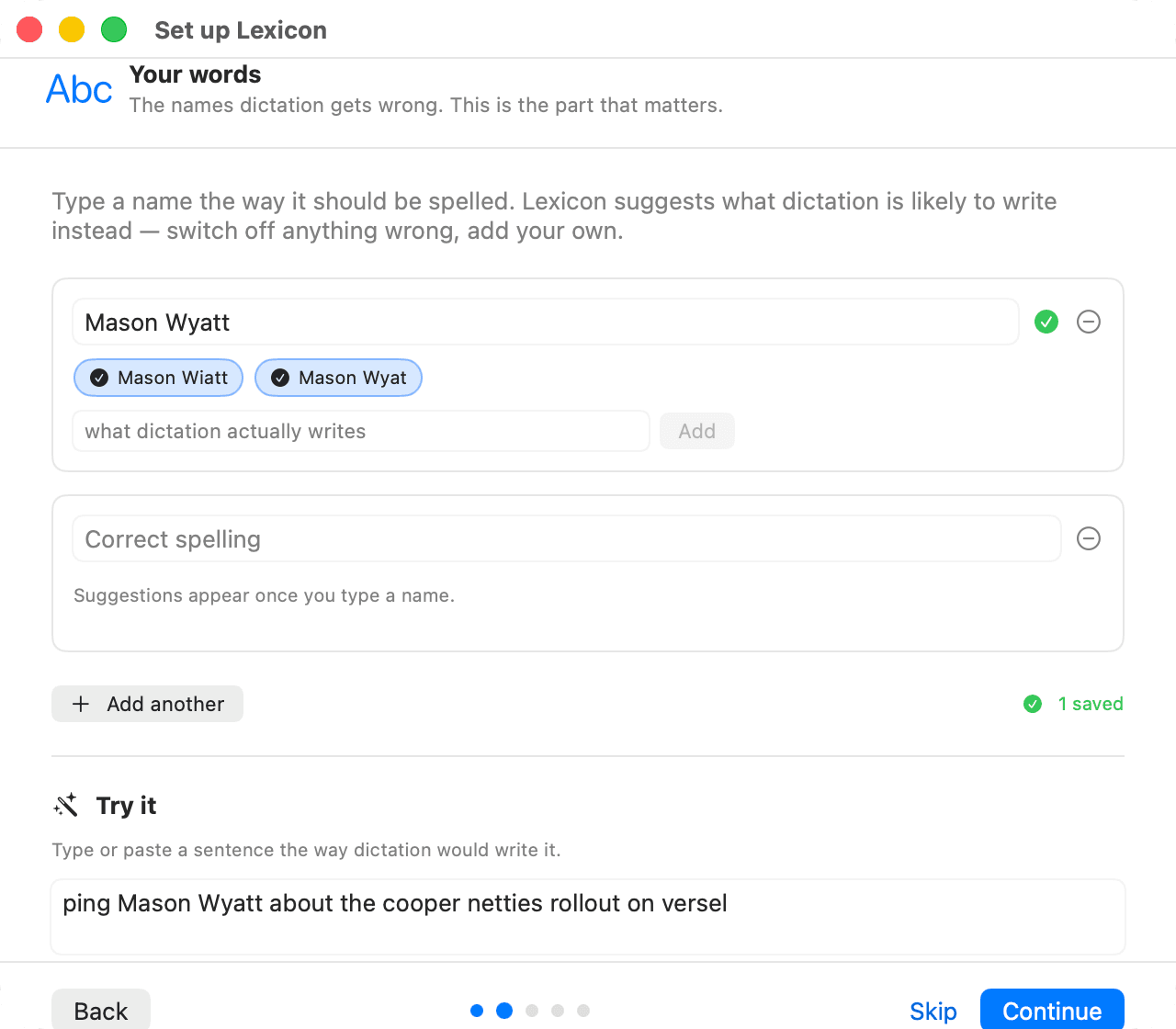
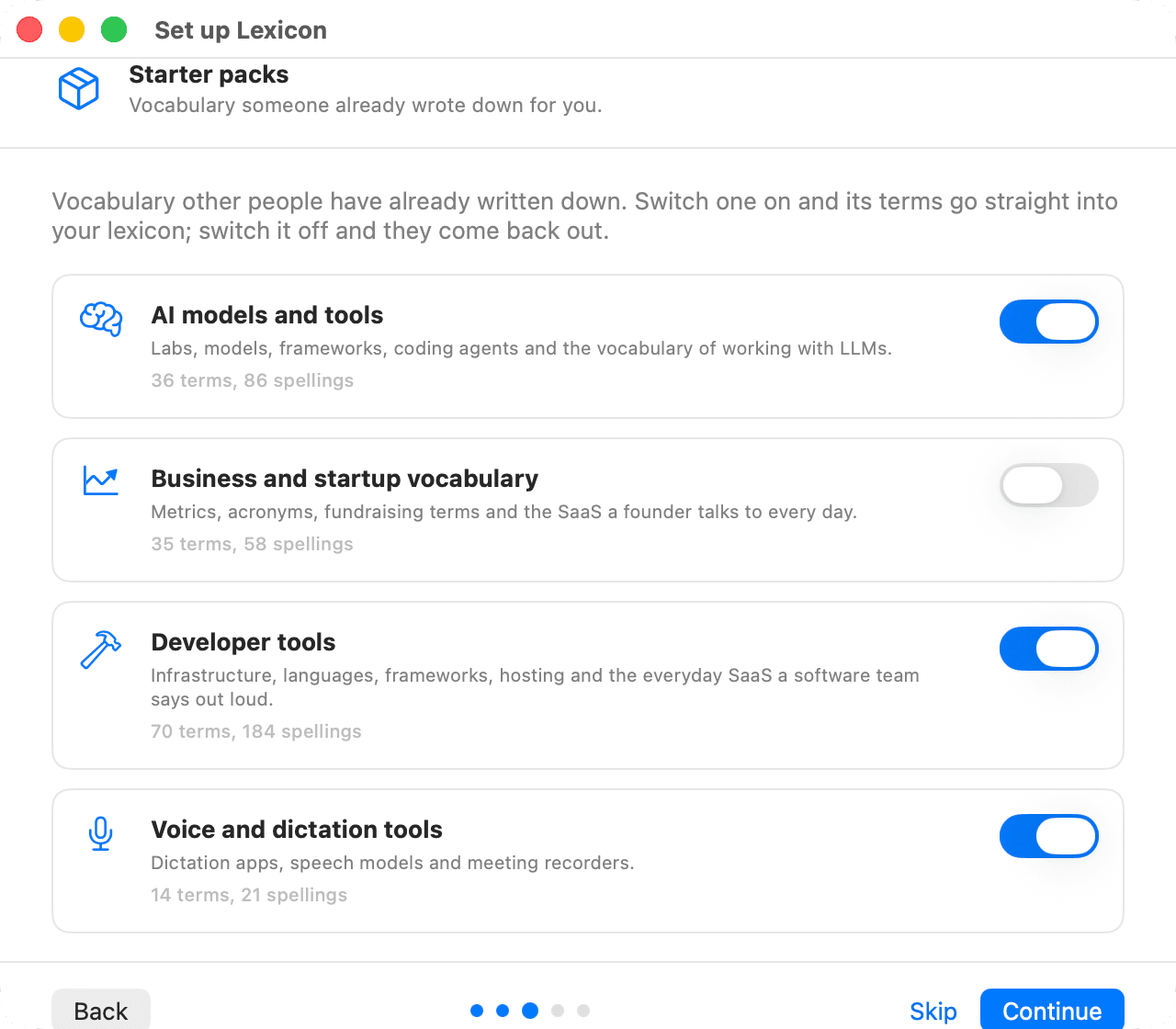
One file. Three places it gets applied.
The lexicon lives at ~/.config/lexicon/lexicon.yaml, with an optional per-project file at the repo root. Everything below reads the same file.
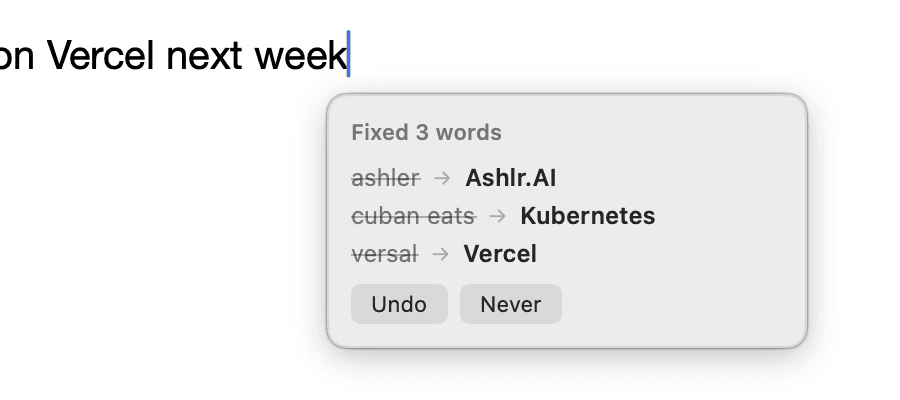
Three words the recognizer had never heard, corrected in the field that had focus. No copying, no pasting, no second window to visit: the bubble beside the caret lists what changed and offers to put it back.
Before the prompt is read
An MCP server with twenty-one tools, plus a Claude Code plugin whose SessionStart and UserPromptSubmit hooks correct the prompt on its way in. Your agent never sees the wrong spelling.
- you say
- add a field to the cuban eats manifest
- hook
- UserPromptSubmit → normalize_transcript
- claude reads
- add a field to the Kubernetes manifest
Before you press send
A browser extension that rewrites the composer in place on ChatGPT, Claude, Gemini, Grok, Perplexity, Copilot and Poe, and on any other site you switch it on for.
Wherever the cursor is
A menu bar app that watches the focused text field through the Accessibility API and rewrites dictated text in place: in your editor, your mail client, your notes. Local push-to-talk with whisper.cpp is built in, and so is a loopback HTTP API if you would rather call it yourself.
- focus
- any text field, any application
- you dictate
- versal deploy failed again
- field becomes
- Vercel deploy failed again
It tells you what it changed
Nothing is rewritten silently. A bubble appears beside the caret naming every word it swapped, with an Undo, and a Never that adds the word to your never list so it is left alone from then on.
A status item, not a window
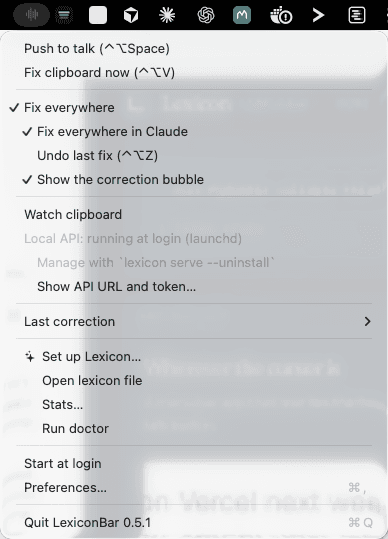
LexiconBar is a menu, and the menu is the whole interface: push to talk, fix the clipboard once, or leave fix everywhere switched on and forget about it. The loopback API and the login item are toggles in the same list.
Measured, with the caveats attached.
41.9%→82.8%
proper-noun recall, whisper.cpp base.en
76.0%→95.7%
small.en, lexicon passed as a Whisper prompt
0 / 72
ordinary prose sentences changed
0.3 ms
to normalize one sentence
Against the alternatives
The same 330 clips through the same recognizer, with the same seventy-term lexicon in every row. The only thing that changes is how the proper nouns get fixed.
| how the words get fixed | recovered | prose wrongly changed |
|---|---|---|
| nothing, raw whisper.cpp | 45.9% | nothing runs |
| exact-string substitution, the macOS Text Replacement approach | 62.0% | 0 of 72 |
| the same, plus a casing rule per term | 71.3% | 0 of 72 |
| whisper.cpp’s own --prompt hint list | 76.0% | nothing runs |
| Lexicon | 91.0% | 0 of 72 |
Exact substitution recovers the spellings someone already wrote down and nothing else. It cannot reach a mistake you have not heard yet, which is what the phonetic and fuzzy tiers are for: they recover 31 of the 279 names on their own, about eleven points, and the rest of the distance is case-insensitive matching and tolerance for how the recognizer splits a name into words. The prompt hint list is a complement rather than a rival, and stacked with the lexicon it reaches 95.7%. The last column is blank for the top two rows because it is unmeasured, not zero: raw whisper runs nothing, while the prompt biases the recognizer itself, so anything it changes is already in the transcript before the measurement begins.
How the audio rows were produced. macOS text-to-speech, three voices, 110 sentences each, read into whisper.cpp. That is far cleaner than a phone microphone (no room, no disfluency, no accent variation), so expect lower raw recall on real speech. The “0 of 72” row counts ordinary prose only; six sentences in the corpus are deliberately adversarial and are excluded.
And the synthetic corpus. On 402 cases sampled from known speech-to-text failures, term recall goes 5.1% to 96.8% with 0 of 95 clean sentences changed. The 5.1% baseline is low by construction, because the corpus is built from failures, so it is not a general accuracy figure for any recognizer.
Read the method or the whole benchmark, including what still fails.
Install once. Say it once.
The setup wizard writes your lexicon, offers to harvest candidate terms from the repo you are standing in, and registers the MCP server with every agent client it finds.
lexicon setup: first run, start to finish.
lexicon pack add developer: 155 curated terms across four packs.
lexicon export wispr: push the same words into the dictation app you already use.
- macOS
The menu bar app, the CLI and the MCP server. Fix everywhere rewrites dictated text in whatever field has focus.
LexiconBar.app.zip - Windows
The CLI and the MCP server, wherever Node 20 or newer is on the PATH. There is no tray app yet.
- Linux® distributions
The CLI and the MCP server, through the install script, Homebrew or npm. There is no tray app yet.
- Browser extension (Chrome, Edge, Brave)
Unpacked zip; load it at chrome://extensions with Developer mode on.
- Browser extension (Firefox)
Load it as a temporary add-on from about:debugging.
- LexiconBar for macOS
Menu bar app, ad-hoc signed: right-click > Open the first time.
Both come from the latest release, with a SHA256SUMS beside them.
curl -fsSL https://ashlrai.github.io/lexicon/install.sh | shmacOS and Linux systems. Checks for Node 20 or newer, installs the CLI, then runs the setup wizard, which writes your first lexicon and registers the MCP server with whichever agent clients it finds.
inside claude code
claude plugin marketplace add ashlrai/lexiconclaude plugin install lexicon@ashlraiBrings the MCP server, the SessionStart and UserPromptSubmit hooks, the lexicon skill and the /lexicon command. No build step.

If you are an agent reading this for someone.
Your user keeps having one name come out wrong. Install Lexicon for them, add that name, and verify it. Everything you need is machine-readable and linked below; you do not have to scrape this page.
- /llms.txt
- A short markdown index of this site: what Lexicon is, who it is for, the install commands, and where everything else lives.
- /llms-full.txt
- The whole thing in one fetch: the problem, the install, the twenty-one MCP tools, the exports, the measured numbers, the privacy claims and the FAQ.
- /mcp.json
- The install manifest. Take the mcpServers key verbatim and merge it into your user's client config; the sibling keys tell you how to get the binary on PATH first and how to check it worked.
- docs/AGENTS.md
- Written to you rather than to a human: the exact commands per client, what to say while you do it, and how to verify the install without guessing.
Lexicon writes only where it is told to. setup_lexicon, install_client and trust_project return a plan by default and change nothing until you pass apply, so you can show your user what will happen and ask first.
{
  "mcpServers": {
    "lexicon": {
      "command": "lexicon-mcp",
      "args": []
    }
  }
}What people ask before they install it.
Why does dictation get my company name wrong?
- Because the name is out-of-vocabulary. A speech recognizer scores candidate words against a language model built from ordinary text, and an invented name has no prior in it, so the decoder picks the nearest common-sounding sequence it does know: "Ashlr.AI" becomes "Ashler", "Kubernetes" becomes "Cuban eats", "Vercel" becomes "versal". The audio was fine and the microphone was fine; the vocabulary was missing. Lexicon fixes it afterwards by mapping the spellings you actually get back to the one you meant.
How do I install Lexicon?
- One command:
curl -fsSL https://ashlrai.github.io/lexicon/install.sh | sh. It checks for Node 20 or newer, installs the@ashlr/lexiconCLI and, when it runs in a terminal, startslexicon setup, which writes~/.config/lexicon/lexicon.yaml, asks how your company and your own name should be spelled, and registers the MCP server with every agent client it finds. Without a terminal (CI, a Dockerfile, an editor's task runner), undersudo, or withLEXICON_NO_SETUP=1, it installs only and ends with a line that says why, thenrun: lexicon setup; run it yourself, as your own user.brew install ashlrai/tap/lexiconandnpm i -g @ashlr/lexiconinstall the same CLI, andnpx @ashlr/lexicon@latest setupruns the wizard with no global install at all. How do I fix a brand name in ChatGPT, Claude, Claude Code, Codex or Cursor?
- Add the term once and Lexicon applies it everywhere.
lexicon setupregisters the Lexicon MCP server in the config file of every client it detects (Claude Code, Claude Desktop, Codex, Cursor, Windsurf, Gemini CLI, VS Code), and in Claude Code it also installs SessionStart and UserPromptSubmit hooks so the correction reaches the model before it reads your prompt. For ChatGPT, Claude.ai, Gemini, Grok, Perplexity, Copilot and Poe in a browser, the Lexicon extension rewrites the composer before you press send. You can add the term from the terminal withlexicon add "Ashlr.AI", or just tell the agent "it is Ashlr.AI, not Ashler" and it calls thelearn_correctiontool. Does Lexicon work with Wispr Flow, Superwhisper or macOS dictation?
- Yes, and in both directions. Lexicon runs after whatever produced the transcript, so it corrects the text those apps write before an agent or a text field sees it. It also exports into their own dictionaries:
lexicon export wisprwrites the CSV that Wispr Flow’s Dictionary > Import reads,lexicon export superwhisperwrites its replacements JSON, andlexicon export macoswrites a Text Replacement.plistfor System Settings.lexicon importreads all three back, so a dictionary you have already trained comes over in one command instead of being retyped. Does Lexicon work in Slack, Mail, Notes and other Mac apps?
- Yes, through the macOS menu bar app. It watches the focused text field through the Accessibility API and rewrites dictated text in place, so it works in Slack, Mail, Notes, your editor, anywhere there is a text field, and you grant Accessibility permission once in System Settings > Privacy & Security. Local push-to-talk with whisper.cpp is built in, and so is a loopback HTTP API on 127.0.0.1 if you would rather call it from your own script. Windows and Linux have the CLI, the MCP server and the browser extension, but no tray app yet.
Is my text sent anywhere?
- No. Your lexicon is a plain YAML file at
~/.config/lexicon/lexicon.yaml: there is no account, no sync and no telemetry, and the CLI, the hooks, the MCP server, the local API and the browser extension make no network request beyond the loopback interface. The only outbound request anywhere in the codebase islexicon voicedownloading a whisper.cpp model the first time you use local push-to-talk; audio itself never leaves the machine. The full threat model, including how an untrusted project lexicon is kept out of model context, is in SECURITY.md. What is an MCP server, and do I need one?
- MCP, the Model Context Protocol, is a standard way for an AI agent to call tools that run on your own machine. Lexicon ships one, named
lexicon, over stdio, with twenty-one tools, two resources and two prompts, so an agent can normalize a transcript, add a term, learn a correction or run setup without you opening a terminal. You want it if you talk to an agent and need the names fixed before the agent acts. You do not need it for the browser extension, the menu bar app or the CLI, which read the same file directly. How is this different from a dictation app’s custom dictionary?
- A dictation app’s dictionary only applies to the text that app produced. Agents increasingly own their own speech-to-text, so a transcript made inside ChatGPT, Claude Code or a phone keyboard never passes through Wispr Flow or Superwhisper, and the same name breaks again in every new place. Lexicon is one file you own, applied at three points instead: before an agent reads a prompt, before you press send in a browser chat, and in any macOS text field. It exports into those dictionaries too, so it replaces none of them and reaches where they cannot.
What does Lexicon cost?
- Nothing. Lexicon is free and MIT-licensed, with no paid tier, no account and no telemetry. The matcher, the CLI, the MCP server, the Claude Code plugin, the browser extension and the macOS menu bar app are all in one public repository at github.com/ashlrai/lexicon.
The same answers live in docs/FAQ.md in the repository, and in /llms-full.txt for anything reading this site with a model.
MIT, and honest about the edges.
The matcher, the MCP server, the CLI, the extension and the macOS app are all in one repository. Your lexicon is a plain YAML file you own: no account, no sync, no audio ever leaves your machine.
- The extension installs from the release zip. It is not in the Chrome Web Store or on Firefox Add-ons yet.
- The macOS app is ad-hoc signed, not notarized.
- Windows and Linux systems have the CLI and the MCP server, but no tray app.
- Voice modes that never produce a text box, such as ChatGPT Voice and Gemini Live, are out of reach: there is no transcript to correct. (lexicon voice does read audio, but it transcribes with your own local whisper.cpp rather than hooking someone else’s voice mode.)
version: 1
terms:
  - canonical: Ashlr.AI
    aliases:
      - Ashler
      - Ashlar
      - Ashley our AI
    phonetic: ASH-ler
    category: brand
    notes: My company. Never write "Ashlar".

  - canonical: SaaS
    aliases: [sass]
    category: acronym
    never: [sauce]   # a real word. leave it alone.